What Multi-Factor Authentication Actually Protects You From
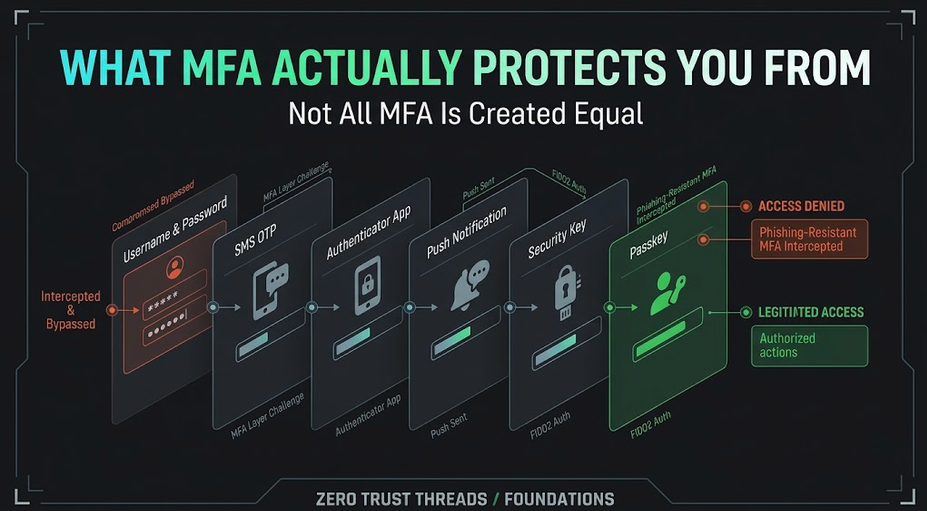
Understanding Multi-Factor Authentication
You enter your password. Then the website asks for something else. Maybe a code. Maybe a push notification. Maybe a security key. Maybe a passkey.
That second step is usually described as multi-factor authentication, or MFA. You have probably been told: Turn on MFA.
That is good advice. But understanding why it helps is more useful than simply checking the box. Because MFA is not magic. It solves specific problems. And different MFA methods provide different levels of protection.
Start With the Basic Problem
Suppose an attacker obtains your password. Maybe it was:
Phished
Reused from another breach
Stolen by malware
Accidentally exposed
Shared with the wrong person
If the account only requires that password, the attacker may be able to authenticate. MFA adds another requirement. The password alone is no longer enough. That changes the attack.
Authentication Factors
Authentication factors are commonly grouped into categories such as:
Something you know: A password or PIN.
Something you have: A security key, phone, or authenticator.
Something you are: A biometric characteristic.
Multi-factor authentication combines factors from different categories. Two passwords are not MFA. Two security questions are not MFA. They are still the same type of factor.
MFA Helps When Passwords Are Stolen
This is one of MFA's biggest benefits. If an attacker knows your password but does not possess the required second factor, authentication becomes more difficult. That means MFA can reduce the damage caused by password theft.
But there is an important catch: The strength depends on the MFA method.
SMS Is Better Than Password-Only, but It Has Limitations
Many systems send a one-time code through SMS. That creates another barrier compared with using only a password. But SMS has weaknesses.
CISA recommends moving away from SMS-based MFA for high-value accounts and notes that SMS is not phishing-resistant. Attackers may target:
Telecommunications infrastructure
SIM-swapping processes
Account recovery
Phishing workflows
This does not mean that everyone should disable MFA because SMS is imperfect. It means: Not all MFA is equal. If SMS is the only second factor available, it may still be preferable to password-only authentication. But stronger options should be used when available.
Authenticator Codes Are Better, but Still Phishable
Time-based one-time passwords generated by authenticator apps are common. They remove some of the risks associated with SMS. But they can still be phished.
Imagine an attacker creates a fake login page. You enter:
Username
Password
123456
The attacker immediately forwards those credentials to the real service. If the code is still valid, it may work. CISA specifically notes that authenticator-generated codes are stronger than SMS in some respects but are still vulnerable to phishing.
Push Notifications Have Problems Too
Push-based authentication can be convenient. You enter your password. Your phone asks: Approve login?
The risk comes when users receive repeated prompts. An attacker with the password may repeatedly trigger authentication requests hoping the user eventually approves one. Context matters. A push approval is only useful when the user understands what they are approving.
Phishing-Resistant MFA Changes the Model
The strongest direction today is phishing-resistant authentication. Instead of asking the user to type a reusable secret or transferable code into a webpage, the authentication method cryptographically verifies the legitimate service.
CISA recommends FIDO-based phishing-resistant authentication and describes hardware FIDO keys as especially strong, with passkeys as an acceptable alternative. FIDO also classifies passkeys as phishing-resistant because authentication is tied to the legitimate verifier.
This matters because the user cannot simply be tricked into giving the attacker a valid one-time code in the traditional way.
MFA Does Not Stop Everything
This is extremely important. MFA does not mean: This account cannot be compromised.
Attackers may still target:
Active sessions
Endpoint devices
Account recovery
Malware
OAuth or application permissions
Help desks
Social engineering
Misconfigured systems
Suppose malware steals an already authenticated session token. The attacker may not need to perform the normal login process again. MFA protected the authentication event. It did not magically secure the entire endpoint.
Recovery Can Become the Weakest Link
Imagine this: Your account uses a hardware security key. Excellent. Then the account recovery process allows a password reset using:
SMS
Weak identity verification
An attacker may attack the recovery process instead of the strong authentication process. Security tends to move toward the easiest available path.
Protecting authentication means examining:
Sign-in
Enrollment
New-device registration
Recovery
Factor replacement
Help-desk processes
MFA Fatigue Is a Human Problem
Security controls interact with people. If users constantly receive unnecessary prompts, they may stop treating prompts as meaningful. That creates risk.
A good authentication experience should make unexpected requests stand out. If your phone asks you to approve a login you did not initiate: Do not approve it just to make the notification disappear. Investigate why it appeared.
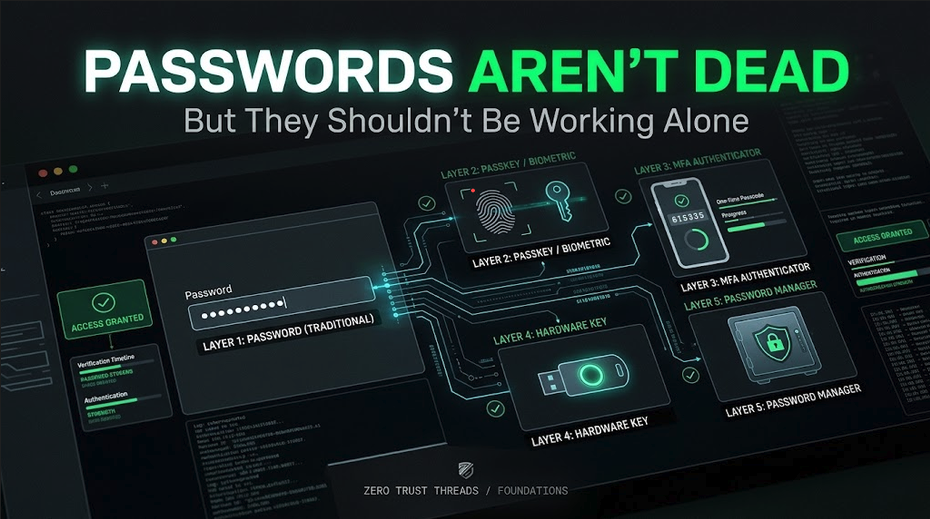
Think in Levels, Not Checkboxes
Instead of asking: "Do we have MFA?" A better question is: "What type of MFA do we use, and what attacks is it designed to resist?"
There is a meaningful difference between:
Password only
Password + SMS
Password + authenticator code
FIDO security key / passkey
They are all authentication approaches. They are not equally resistant to phishing.
What Should Beginners Use?
When services support it, a good practical order is:
Use phishing-resistant methods such as passkeys or FIDO security keys when practical.
Otherwise use strong MFA such as an authenticator application.
Use SMS when better options are unavailable rather than defaulting to password-only authentication.
Protect recovery methods.
Remove weak fallback methods when they are no longer necessary.
The exact choice depends on the service and your threat model.
Key Takeaway
MFA protects you by making one stolen credential insufficient. That is powerful. But MFA is not one technology. Different methods resist different attacks.
SMS and one-time codes can still be phished. FIDO-based methods and passkeys provide stronger phishing resistance. And no MFA method protects every part of the system.
So do not stop at: MFA enabled. Ask: What kind?
Verified References
CISA recommends FIDO-based phishing-resistant authentication, identifies hardware security keys as especially strong, and recognizes passkeys as an acceptable alternative. It also warns that SMS and authenticator codes are not phishing-resistant.
FIDO classifies passkeys as phishing-resistant while identifying passwords and common one-time-password methods as phishable.
About the author
- Zero Trust Threads is a cybersecurity media and lifestyle brand focused on making cybersecurity, Linux, networking, GRC, and tech culture approachable through practical projects, real-world learning, and a little humor. Trust nothing. Learn everything.
Comments
Join the discussionNo comments yet. Be the first to comment.
Zero Trust Threads Foundations
Cybersecurity does not have to be learned all at once. Zero Trust Threads Foundations breaks down essential cybersecurity and IT concepts into approachable, practical lessons for beginners. Learn the fundamentals of HTTP security, home labs, Linux, logs, defensive security, and more while building the knowledge needed for hands-on learning.